
GDPR in practice: how to handle data requests and document consent in Flexmail
When someone asks you for a copy of their data, or requests to be forgotten, it can feel like an overwhelming task, especially if you use multiple tools. This article explains exactly what your responsibilities are as a Flexmail customer, what Flexmail stores about your contacts, and how you can find and use that information to respond to common GDPR requests.
Understanding your role
Under the GDPR, you are the data controller. That means you are responsible for deciding why and how your contacts' personal data is processed. Flexmail is your data processor: we process data on your behalf and on your instructions, as laid out in our Data Processing Agreement (DPA).
In practical terms, this means that when one of your contacts submits a GDPR request to you, you are the one who needs to respond. Flexmail provides you with the tools to do so.
What data does Flexmail store about a contact?
Before you can respond to any request, it helps to know what information Flexmail actually holds. For each contact in your account, Flexmail can store:
- Email address and any contact fields you have set up (name, phone number, company, custom fields, etc.)
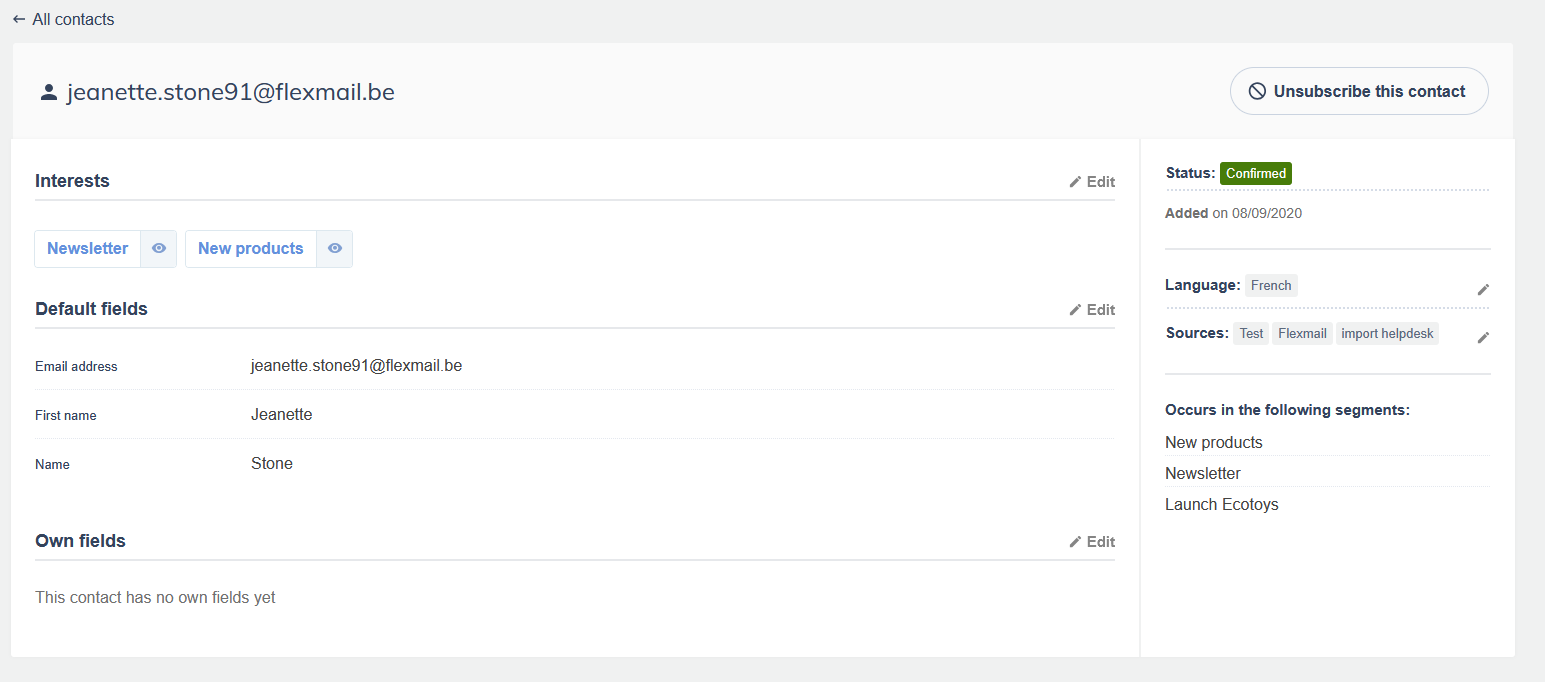
- The source or sources through which the contact was added to your database. If they subscribed via a Flexmail opt-in form, Flexmail automatically records which form was used. If you imported them manually, you can add a source label yourself.
- Interests and segments the contact belongs to
- Campaign history: which emails they received, opened, or clicked
- Unsubscribe events: whether they clicked an unsubscribe link and when
This data is stored in your Flexmail account for as long as your account is active.
How to pull a full data report for one contact
If a contact submits a right of access request (they want to know what data you hold about them), here is how to find everything Flexmail has on that person.
- Go to Contacts in the main navigation.
- Search for the contact by email address.
-
Open the contact's profile. Here you will see all the contact fields, sources, and interests linked to this person.
- To get their campaign history, go to Contacts > Contact reports > Start a new search, enter the email address, check all items and set a timeframe. This generates a contact report that includes:
- Date of import or subscription
- Opt-in form used (if applicable)
- Campaigns sent to this contact
- Opens and clicks
- Unsubscribe link clicks
You can use this report as the basis for your response to the data subject. Keep in mind that you may also need to gather data from other tools you use alongside Flexmail, such as your CRM, webshop, or analytics platform.
How consent is documented in Flexmail
Consent documentation is one of the most common questions we receive. Here is how Flexmail helps you with this.
When a contact subscribes through a Flexmail opt-in form, Flexmail automatically records the form name as a source on the contact's profile. This tells you where and how the contact entered your database. The form itself acts as the consent moment: the contact actively filled in your form and submitted it.
When you import contacts manually, you are responsible for having documented consent outside of Flexmail (for example, a signed paper form, a checkbox on your own website, or a record in your CRM). When you do the import, add a meaningful source label, such as "Trade fair Brussels – May 2024" or "Webshop checkout opt-in – Q1 2025". This makes it much easier to trace consent later.
Support tip Add a source every time you add contacts to Flexmail, whether through a form, an import, or an API connection. A contact can have multiple sources if they signed up more than once through different channels. The more precise your source labels, the easier it becomes to demonstrate when and how you obtained consent.
Why deleting contacts is almost always the wrong choice
It can be tempting to delete contacts from Flexmail to restructure your database and start again, to stay within your current contact tier, or simply because someone has unsubscribed and you feel like there is no reason to keep them around. In almost every case, deleting a contact causes more problems than it solves.
You lose all historical data permanently.
When you delete a contact, everything Flexmail has collected about them disappears: their sources, their campaign history, which emails they received, which links they clicked, and when they unsubscribed. If you re-import that contact's email address later, Flexmail treats them as a completely new contact with no history. There is no way to reconnect them to their previous record.
Previously sent emails stop working correctly for that person.
The tracked links inside campaigns you already sent will continue to function as ordinary links, so the recipient can still click through to your website. However, Flexmail can no longer log those clicks against a contact profile, because the profile no longer exists. More importantly, if that person clicks an unsubscribe link in an older email, the unsubscription has nowhere to be recorded. They will not be added to your blacklist, which means they could be emailed again in a future send or import. This is exactly the outcome the blacklist exists to prevent.
You lose your opt-out protection.
When a contact unsubscribes through a Flexmail email, they are added to your blacklist. The blacklist is what stops you from accidentally recontacting them, even if their email address appears in a future import or CRM sync. If you delete a contact instead of letting the blacklist do its job, that protection disappears entirely.
What to do instead.
If a contact has unsubscribed, leave them on the blacklist. If you are approaching a contact tier limit, remember that a growing audience is a good thing. Email marketing has the highest ROI of any marketing channel, and your contact list is one of your most valuable business assets. The goal is to send strong campaigns consistently and bring people back to your website and products, not to shrink your list. If you genuinely need to reduce your contact count, focus on removing hard bounces and addresses that have never engaged, rather than deleting real contacts. You can also reach out to our support team to discuss the right approach for your situation.
Attention The only situation where deleting a contact is appropriate is when you receive a verified right to erasure request under the GDPR. Even then, make sure you export the contact report first and keep a record in your own administration that the erasure was completed.
How to handle a right to erasure request ("right to be forgotten")
If a contact asks you to delete all their data, here is the recommended approach in Flexmail:
- Find the contact in your Contacts overview.
- Before deleting, export their contact report (see above) and save it in your own records. You may need to demonstrate that you processed the erasure request.
- Delete the contact from Flexmail.
Warning: deleting a contact removes their data from your active database, but it also removes the opt-out history. If there is any chance this person could end up in a future import, keep a note in your own administration that this email address must not be recontacted. Your DPA with Flexmail does not automatically cover data held in other systems, so make sure you also delete or anonymise the contact in your CRM, webshop, and any other tools you use.
Handling GDPR requests across multiple systems
Many Flexmail customers use Flexmail alongside other tools. Here is a simple checklist to work through when you receive a GDPR request:
- Export the contact report from Flexmail
- Check your CRM for data linked to this person
- Check your webshop or booking system
- Check any other integrations (Zapier, API connections, analytics tools)
- Document that you have completed the request and the date on which you responded
Under the GDPR, you have one month to respond to a data subject request.
What Flexmail's DPA covers
When you use Flexmail, you automatically agree to our Data Processing Agreement. This agreement confirms that:
- Flexmail processes your contacts' data only on your instructions
- All processing takes place within the European Union or in countries with an adequate level of protection
- Flexmail will assist you if a data subject contacts Flexmail directly about their data
- You remain responsible for the lawfulness of the data you provide to Flexmail, including whether you have valid consent
If you are ever asked by a data subject or a supervisory authority to demonstrate that your email marketing is GDPR-compliant, your DPA with Flexmail is one of the documents you will want to have on hand.
Next steps
Now that you understand how consent is tracked and how to handle data requests, a good next step is to review your current opt-in forms in Flexmail and check that each one has a clear, descriptive name (that will be used as source).
If you have questions about a specific GDPR scenario or need help pulling a contact report, our support team is happy to help.